
Keycloak as a Service
For the past 8 years, please-open.it has been helping organizations of all sizes implement and operate Keycloak-based authentication solutions. Our expertise covers the entire lifecycle: architecture design, custom component development, integration, operational maintenance, and training. We work with startups, large enterprises, government agencies, and public administrations, always with the same commitment: ensuring the security and reliability of identity systems.
Over the years, we’ve developed and open-sourced numerous components that enrich the Keycloak ecosystem:
- oidc-bash-client (120+ stars) - A complete OAuth2/OIDC client written in Bash that implements all standard flows (Authorization Code, Device Code, Client Credentials) without heavy dependencies
- authenticator-filter-ip - Filter user connections based on IP address ranges for enhanced security
- keycloak-filter-email-domain-whitelist-blacklist - Control which email domains are authorized for user registration
- LDAP-Bind-Proxy - Add LDAP protocol compatibility layer on top of OpenID Connect, translating LDAP authentication requests into OAuth2 password grant flows
All these components are deployed in production by many clients. Find all our projects on our GitHub organization.
Our technical blog (blog.please-open.it) has also become a reference for the French-speaking Keycloak community, with thousands of monthly visits on articles detailing advanced use cases:
- Device Authorization Grant (RFC 8628) - Implementing OAuth2 Device Flow for browser-less applications like CLI tools, IoT devices, and smart TVs
- Custom Event Listeners - Building event listeners for audit trails, compliance reporting, and real-time monitoring
- n8n with OpenID Connect - Securing workflow automation with OIDC authentication and token management
So the next step was : building a complete, scalable and reliable Keycloak As A Service. To achieve this ambitious goal, we chose to partner with Clever Cloud, combining our deep Keycloak expertise with their proven cloud infrastructure capabilities. This partnership allows us to pool our respective strengths and deliver a coherent, credible, and enterprise-ready managed identity solution.

Clever Cloud is a European Platform as a Service (PaaS) founded in 2010, offering a fully automated cloud infrastructure for developers. Based in France with data centers across Europe, Clever Cloud enables teams to deploy, run, and scale applications without managing servers or infrastructure.
The platform stands out for three key differentiators:
- European data sovereignty: GDPR-compliant infrastructure with all data hosted in European data centers
- Automatic scaling: Applications scale from zero to hundreds of instances based on real-time demand
- Git-based deployment: Going to production is as simple as
git push- no complex CI/CD pipelines required
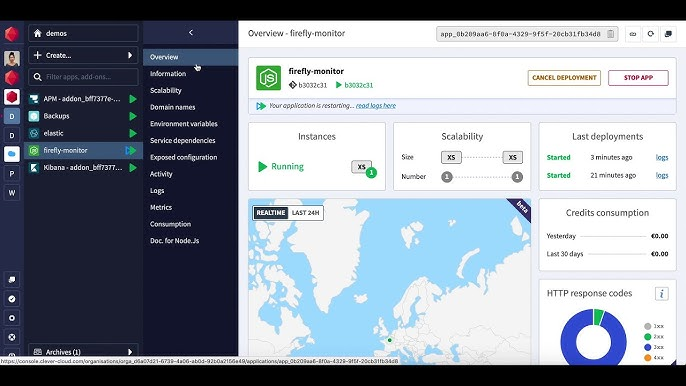
Clever Cloud supports a wide range of languages and frameworks (Java, Node.js, Python, PHP, Go, Rust, Docker, and more) and provides fully managed add-ons including PostgreSQL, MySQL, MongoDB, Redis, Elasticsearch, and now Keycloak.
With a developer-first approach, Clever Cloud handles all operational complexity—security patches, scaling, monitoring, backups—allowing teams to focus on building features rather than maintaining infrastructure. This makes it an ideal foundation for our managed Keycloak service, combining robust infrastructure with specialized IAM expertise.
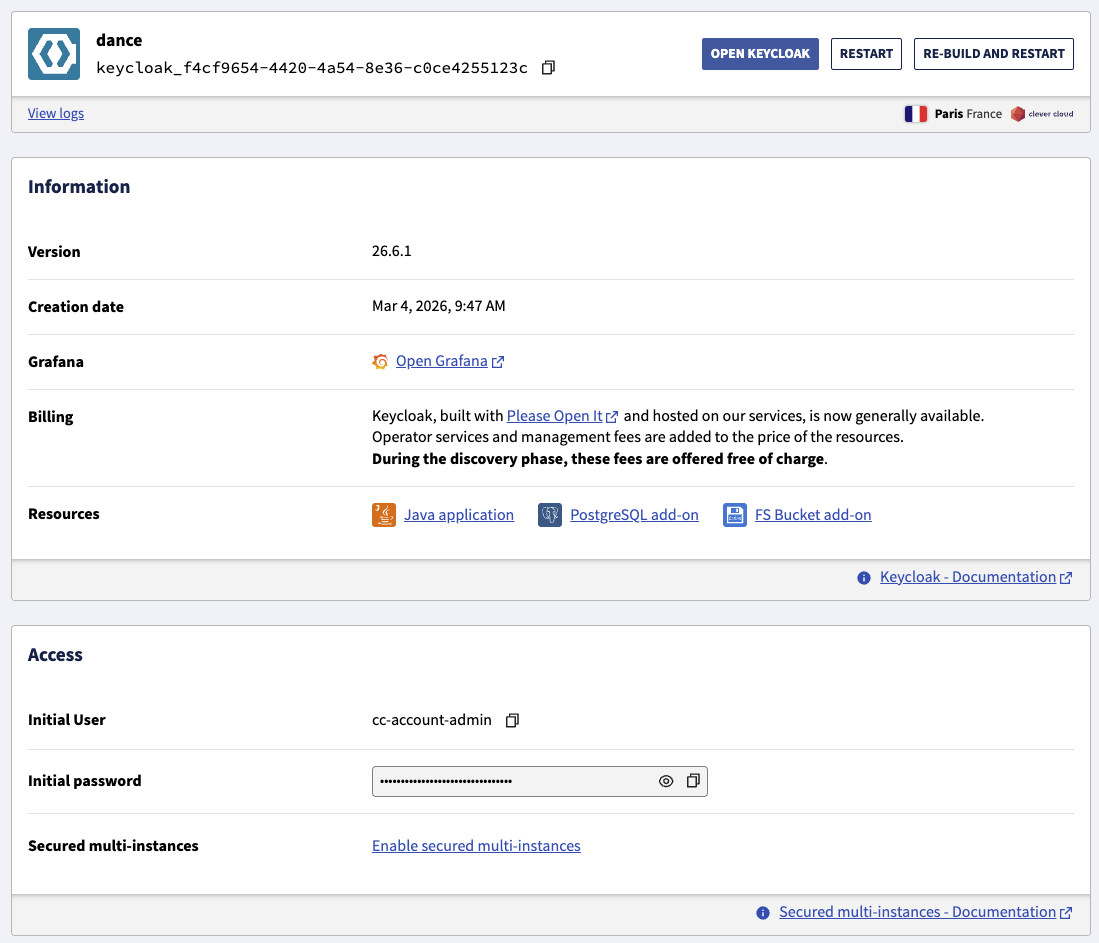
Deploying Keycloak on Clever Cloud is remarkably straightforward. When you create a Keycloak add-on, the platform automatically provisions and configures three interconnected components:
- A Java application instance running Keycloak with optimized settings
- A PostgreSQL database for storing all identity data (users, roles, clients, configurations)
- An FS Bucket for themes, custom plugins, and realm import/export operations
The entire provisioning process takes just a few seconds. You can deploy via the Clever Cloud Console or using the CLI:
clever addon create keycloak my-keycloak --org my-organization
Upon creation, you receive:
- A unique URL for accessing your Keycloak instance
- Temporary admin credentials (password change required on first login)
- Automatic HTTPS certificate provisioning
You can also specify custom domains at creation time using the --option access-domain flag.
One of the most powerful features of the managed service is automatic vertical and horizontal scaling tailored to your needs.
For production workloads requiring high availability and elastic scalability, we recommend enabling horizontal scaling. This requires activating Secured Multi Instances directly from the Keycloak dashboard.
When you enable this feature, Clever Cloud:
- Automatically deploys a second Java application instance
- Creates a private Network Group with WireGuard encryption
- Configures Infinispan clustering for distributed caching and session replication
- Provides automatic load balancing across instances
- Ensures zero-downtime deployments with rolling updates
The communication between instances happens over an encrypted private network, ensuring security while maintaining the performance benefits of clustering.
Once Secured Multi Instances is activated, you can configure horizontal autoscaling to automatically adjust the number of running instances based on real-time load:
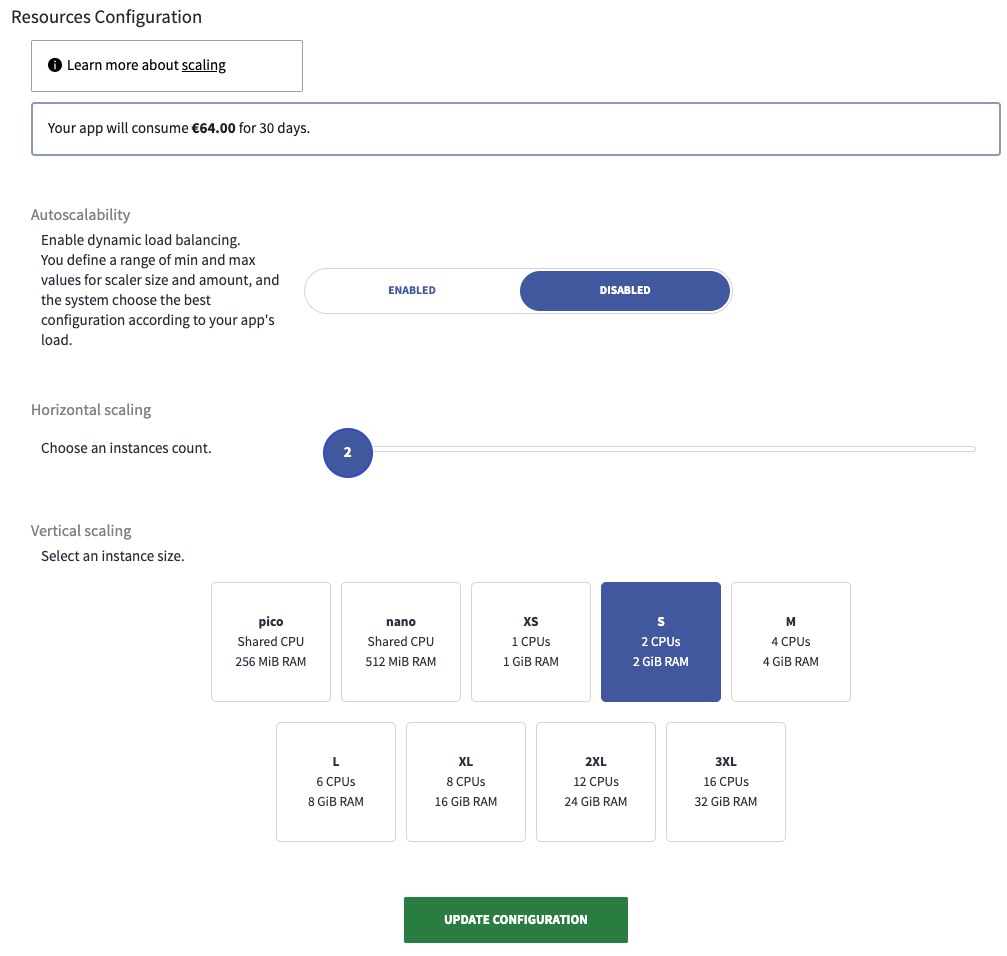
Set minimum and maximum instance counts, and Clever Cloud will automatically scale your Keycloak cluster up during traffic spikes and scale down during quiet periods. This ensures optimal resource utilization and cost efficiency while maintaining performance and availability.
You can enable, disable, or adjust autoscaling parameters at any time based on your traffic patterns and budget constraints.
Operational visibility is built into the service with comprehensive monitoring capabilities.
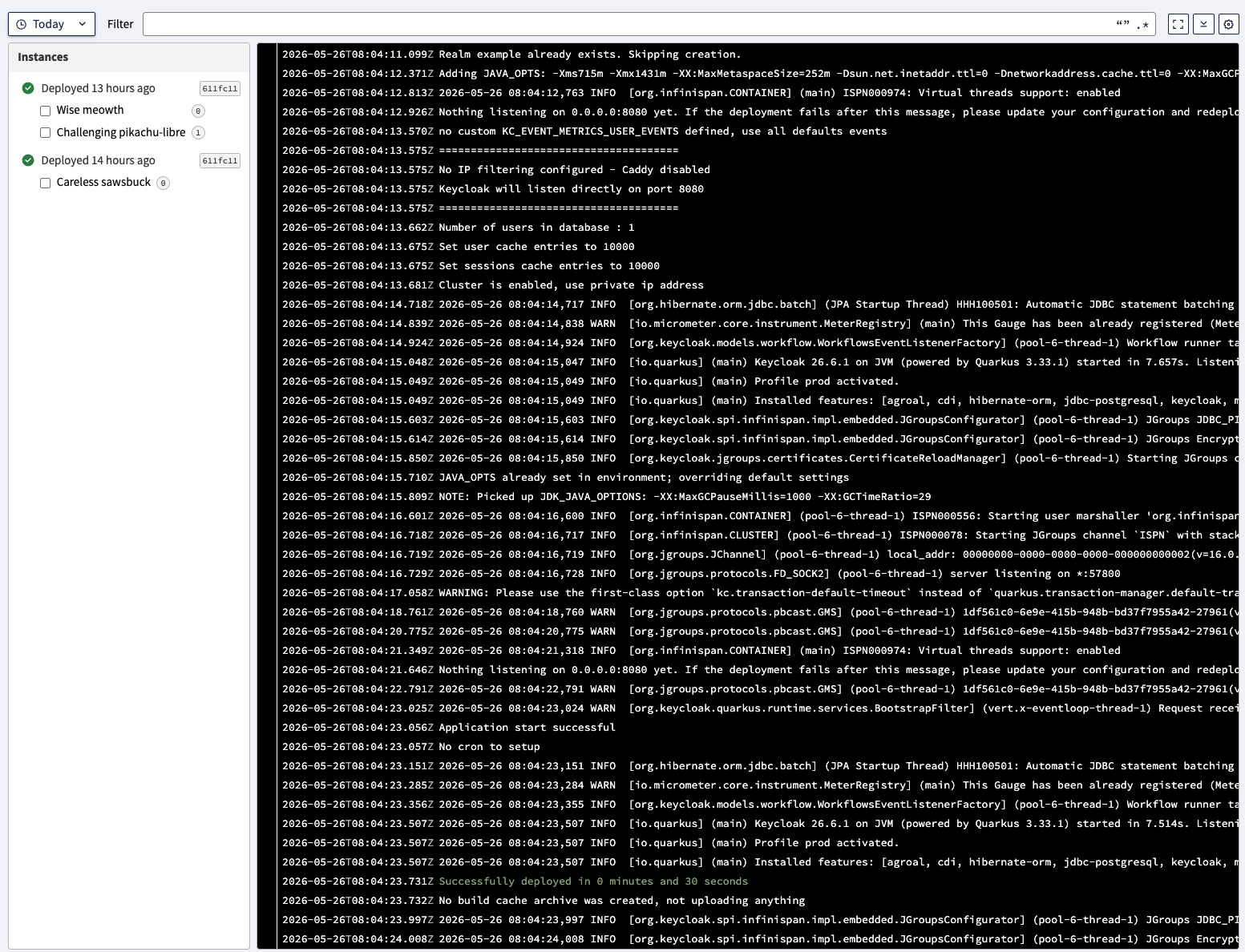
The Clever Cloud console provides real-time log streaming with:
- Full-text search across historical logs
- Filtering by severity level and time range
- Log retention for troubleshooting and audit purposes
- Integration with external log management systems
Starting with Keycloak version 26.2, a pre-configured Grafana dashboard is available, providing deep insights into your Keycloak operations:
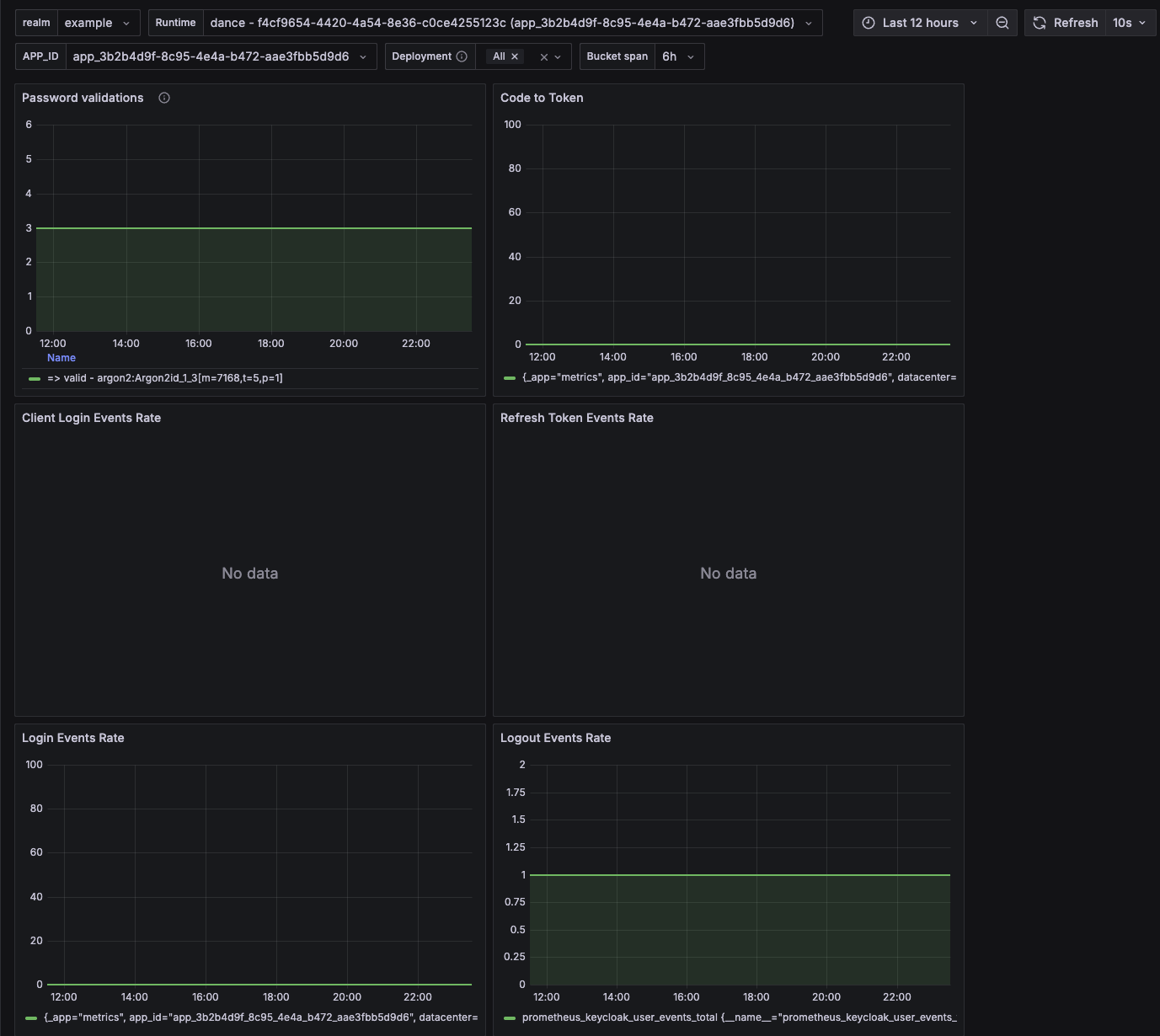
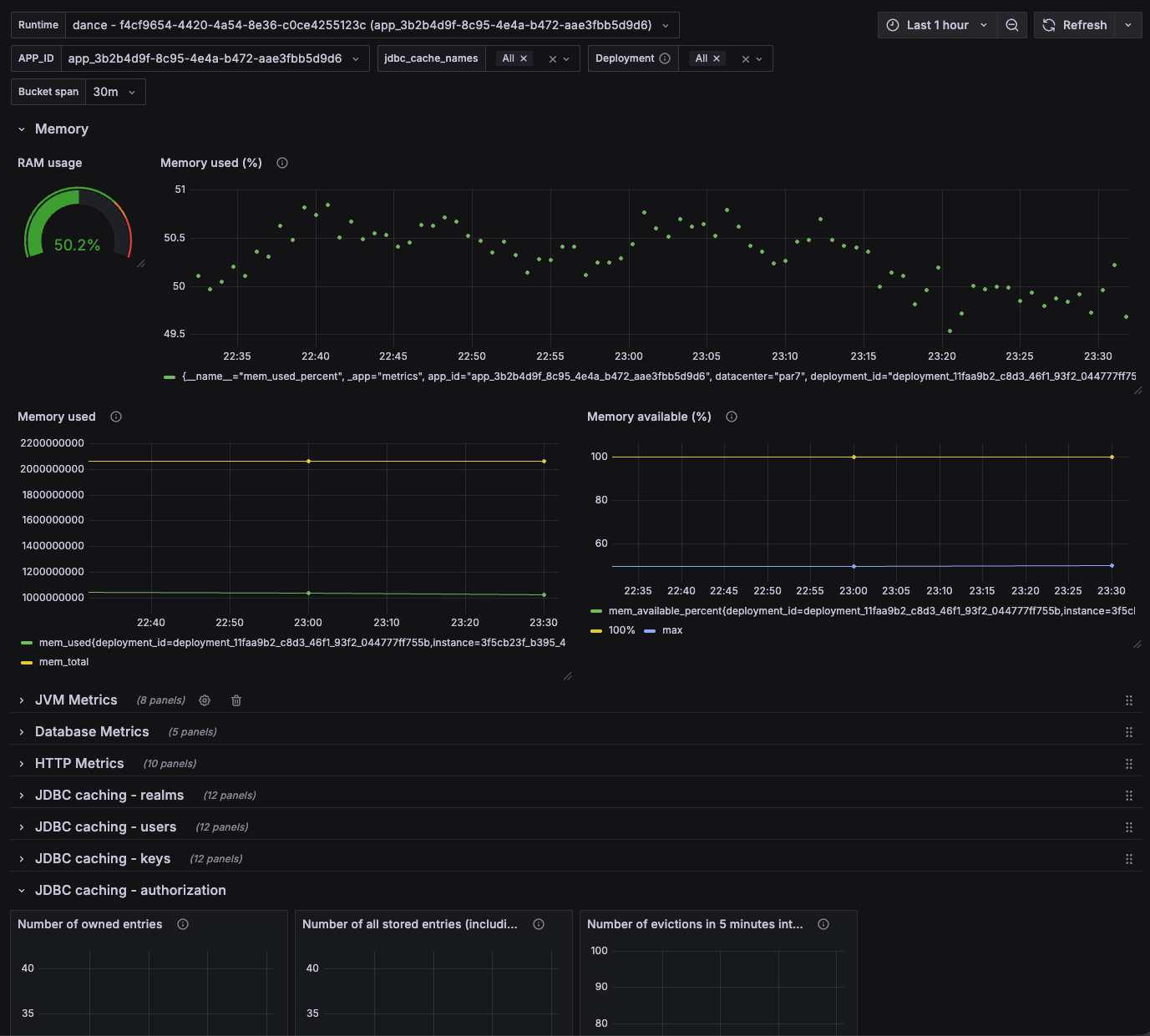
The dashboard exposes Prometheus metrics including:
- HTTP metrics: Request rates, response times, status code distribution
- JVM metrics: Memory usage, garbage collection statistics, thread counts
- Cache performance: Infinispan hit/miss ratios, eviction rates
- Database metrics: Connection pool health, query execution times
- Authentication metrics: Login success/failure rates, token generation statistics
- Realm-specific metrics: Per-realm activity and resource consumption
To set up the dashboard:
- Navigate to your organization’s “Metrics in Grafana” section
- Import the pre-built dashboard from:
https://cc-keycloak.cellar-c2.services.clever-cloud.com/keycloak-grafana-dashboard.json - Select your Keycloak add-on in the runtime dropdown
You can configure alerts on any metric to proactively monitor your identity infrastructure.
Security is paramount for identity systems. The managed Keycloak service provides granular IP filtering at multiple levels.
Starting with version 26.6, you can restrict access to specific endpoints using environment variables:
# Restrict admin console to office IPs
CC_KEYCLOAK_ADMIN_IPS_master=203.0.113.10,203.0.113.11

# Limit production realm to application servers
CC_KEYCLOAK_PUBLIC_IPS_production=198.51.100.10,198.51.100.11

# Control SCIM provisioning endpoints
CC_KEYCLOAK_SCIM_IPS_production=198.51.100.42

# Global admin fallback
CC_KEYCLOAK_ADMIN_IPS=203.0.113.10
This approach blocks unauthorized traffic before it reaches the authentication layer, providing infrastructure-level protection.
The FS Bucket integration enables deep customization without complex deployment pipelines.
To customize your login pages, account management interface, or admin console:
- Create your theme following Keycloak’s theme structure
- Upload theme files to the
themes/folder in your FS Bucket - Rebuild and restart the Java application (Keycloak automatically discovers new themes)
- Select your theme in the realm settings
Your branding persists across Keycloak version upgrades.
To extend Keycloak functionality with custom providers:
- Package your provider as a JAR file
- Upload to the
providers/folder in your FS Bucket - Rebuild and Restart the Java application
That’s it, no more steps.
The FS Bucket also serves as the central location for realm management:
Exporting realms:
# Set environment variable with realm names (comma-separated)
CC_KEYCLOAK_EXPORT_REALMS=production,staging

# Rebuild the application - exported realms appear in realms/export/
Importing realms:
- Upload realm JSON files to
realms/import/in your FS Bucket - Rebuild the application - Keycloak processes imports automatically
This workflow enables infrastructure-as-code practices and simplifies environment provisioning.
One of the most powerful features of the Clever Cloud platform is the seamless integration of OAuth2 Proxy through Request Flow.
Request Flow allows you to chain multiple HTTP services before requests reach your application. This enables adding authentication, caching (Varnish), or custom routing without modifying your application code.
Using our oauth2proxy-config-generator, you can quickly generate the required configuration. Here’s an example protecting a PHP application:
# Enable OAuth2 Proxy via Request Flow
CC_REQUEST_FLOW="oauth2proxy"

# OAuth2 Proxy Configuration
OAUTH2_PROXY_CLIENT_ID="php"
OAUTH2_PROXY_CLIENT_SECRET="-------------"
OAUTH2_PROXY_COOKIE_SECRET="-----------------"
OAUTH2_PROXY_EMAIL_DOMAINS="*"
OAUTH2_PROXY_OIDC_ISSUER_URL="https://your-keycloak.services.clever-cloud.com/realms/example"
OAUTH2_PROXY_PROVIDER="keycloak-oidc"
OAUTH2_PROXY_PROVIDER_DISPLAY_NAME="example"
OAUTH2_PROXY_REDIRECT_URL="/*"

# Application-specific settings
CC_COMPOSER_VERSION="2"
CC_PHP_VERSION="8"
With just these environment variables, your application is protected by Keycloak authentication. OAuth2 Proxy handles:
- Login redirects to Keycloak
- Token validation and refresh
- Session management
- Logout flows
- Injecting user information headers to your application
This works for any runtime supported by Clever Cloud: Node.js, Python, Go, Docker, static sites, and more. No code changes required—just set the environment variables and deploy.
- Legacy applications: Add modern authentication to applications that don’t support OIDC natively
- Static sites: Protect documentation, admin panels, or internal tools
- Microservices: Enforce authentication at the edge before requests reach backend services
- Development/staging environments: Quick authentication layer for non-production environments
The combination of managed Keycloak and Request Flow OAuth2 Proxy creates a powerful, zero-code authentication solution for your entire application portfolio.
Ready to get started? Deploy your Keycloak instance now or read the complete documentation.