
Secondary Email in Keycloak: Protect Your Privacy
When authenticating with external services via OAuth2/OpenID Connect, your primary email address is often shared by default in the token claims. But what if you don’t want to expose your main email to every third-party application?
Common scenarios include:
- Protecting your primary inbox from potential spam or data breaches
- Separating professional and personal identities when using work-related services
- Testing applications without exposing your real email
- Email migration while maintaining access to old services
Keycloak natively supports only one email address per user. The keycloak-secondary-email extension solves this by allowing users to add a verified secondary email and choose which one to share during authentication.
When logging into an application, users are presented with two options:
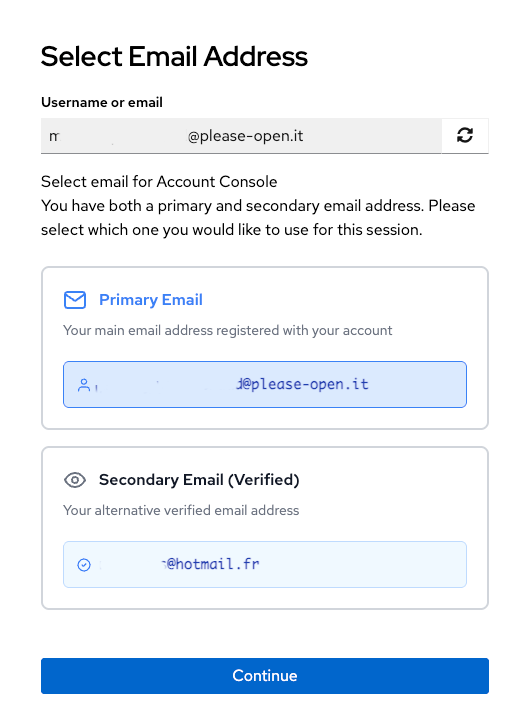
- Use Secondary Email - Your verified secondary address
- Share My Email - Your primary email address
The secondary email is verified through a secure code sent to the address, ensuring ownership before it can be used.
The OpenID Connect Core specification defines the email claim as the user’s preferred email address. Critically, there’s no requirement for this to be the user’s primary account email.
From Section 5.1 (Standard Claims):
email: End-User’s preferred e-mail address. Its value MUST conform to the RFC 5322 addr-spec syntax. The RP MUST NOT rely upon this value being unique.
This means that during the authentication flow, Keycloak can legitimately provide the user’s chosen email (primary, secondary, or masked) in the token, without violating the OIDC standard. The extension leverages this flexibility to give users control over their data sharing.
The extension consists of three main components:
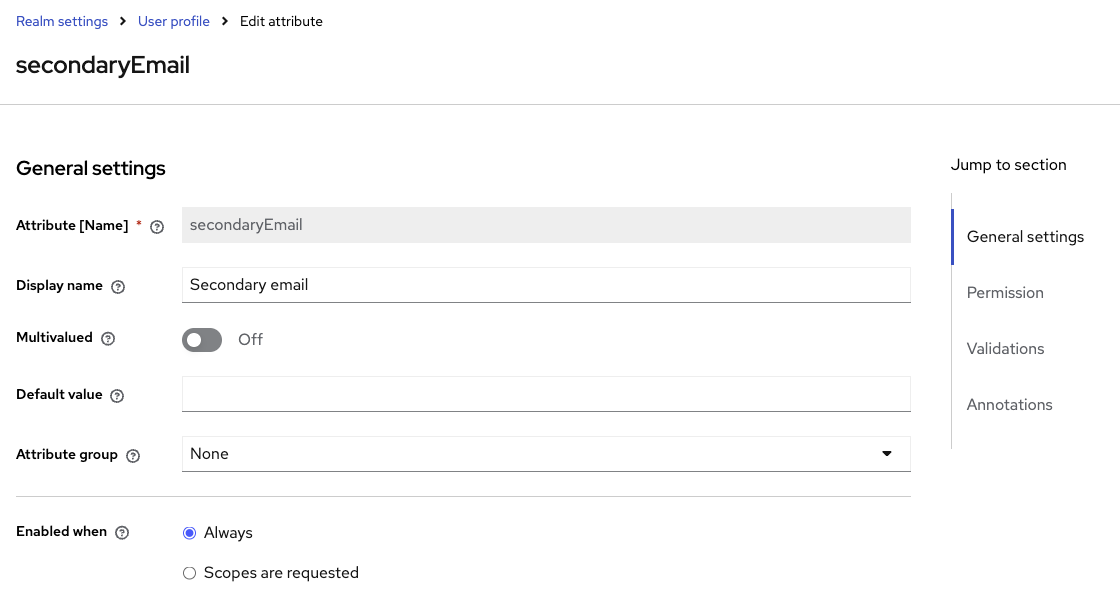
The secondary email is declared as a user attribute in Keycloak’s User Profile configuration:
- Attribute name:
secondaryEmail - Validation: Email format, uniqueness check
- Verification flag:
secondaryEmailVerified(boolean)
This ensures proper validation and prevents duplicate emails across the realm.
The Required Action handles the verification workflow:
- User enters a secondary email address
- Keycloak generates a 6-digit verification code (expires in 10 minutes)
- Code is sent to the secondary email via SMTP
- User enters the code to complete verification
- The
secondaryEmailVerifiedattribute is set totrue
An authenticator is added to the authentication flow, typically after username/password validation. It presents the user with the three email choices and modifies the authentication context to:
- Update the
emailclaim in the token with the selected address - Maintain audit logs of which email was shared
- Handle masked email generation if “Hide My Email” is chosen
- User control: Users decide on a per-application basis which email to expose
- Verified ownership: Codes ensure users actually control the secondary email
- Audit trail: Administrators can track which emails are shared with which clients
- Uniqueness guaranteed: No two users can claim the same secondary email
- Time-limited verification: 10-minute expiry reduces attack window
- Privacy-conscious users: Protect primary email from third-party services
- Enterprise environments: Separate corporate identity from external integrations
- Multi-tenant platforms: Let users manage multiple identity contexts
- Email migration: Transition gradually while maintaining service access
The keycloak-secondary-email extension brings email flexibility and privacy control to Keycloak, fully compliant with OpenID Connect standards. By letting users choose which email to share during authentication, it addresses a common privacy concern while maintaining security through verified ownership.
The implementation is production-ready and follows Keycloak’s extension patterns for Required Actions, User Profile validation, and authentication flows.
Try it now: github.com/please-openit/keycloak-secondary-email
Looking for more Keycloak extensions? Check out our other open-source projects on github.com/please-openit